Editing videos

Converting the video format
You can convert the format of video taken with your camera to more versatile format.
-
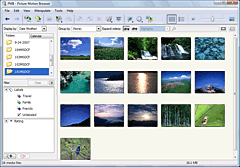
In the main window, select the video you want to convert.
 Hint
- You can select two or more videos at the same time. (Hints on selecting videos and still images)
-
Select [Convert to WMV and Save] in the [Manipulate] menu.
The [Convert to WMV and Save] window is displayed.
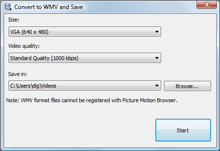
Hints- When the video is in MP4(AVC) format, it can be converted faster by selecting [Low Quality/Smaller File Size]. In this case, the selected videos are converted with lower image quality.
- WMV is a compressed video file format that features a higher compressibility than other file formats and a smaller file size. This format is used mainly in Internet streaming.
- Specify where to save the video file.
- Click [Start].
|
Copyright 2008 Sony Corporation
|
P0187-01-US
|