Importing videos and still images

Importing videos and still images from the Memory Stick slot of a computer
You can import the videos and still images stored on a “Memory Stick Duo” by inserting the “Memory Stick Duo” into the Memory Stick slot of your computer.
- Turn on the computer.
- Insert a recorded “Memory Stick Duo” into the Memory Stick slot on your computer.
-
Double-click
 (PMB - Picture Motion Browser) on the desktop.
[Picture Motion Browser] starts up.
- Click
 at the top of the window.
Or, select [Import Media Files] in the [File] menu.
-
Select [Digital Still Camera/Memory Stick (DCF Format)], and then click [OK].
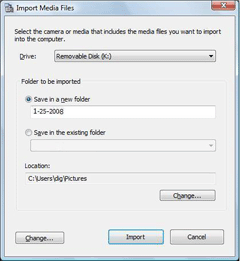
The window used to select the drive/folder for the videos and still images to be imported from/to is displayed.
-
Click [Import].
 Hint
- The still images are imported all at once. You can not import selected still image.
|
Copyright 2008 Sony Corporation
|
P0184-01-US
|